
Decoder (Wireless Devices)

Decoder (Wireless Devices)

A Decoder lets you connect wireless devices (LoRaWAN and Sidewalk) that send data in their own compact, non-standard format. You upload a small script that /IOTCONNECT™ runs in the cloud to turn the device’s raw payload into clean, readable telemetry — so your device works with the platform without changing its firmware.

What is a Decoder, and Why Do You Need One?

Many wireless devices — especially LoRaWAN and Sidewalk sensors — are built to save battery and bandwidth, so they send their data as a tiny string of raw bytes rather than readable JSON. For example, a temperature sensor might send 0x010FA000 instead of {"temperature": 27.2}. Only the device maker knows how to interpret those bytes.

A decoder is the translator. It takes the raw bytes and turns them into meaningful values the platform understands.

Raw data is the compact, encoded payload the device transmits — efficient for the device, but not human-readable.

Decoded data is the clean JSON the decoder produces — named attributes with proper values that /IOTCONNECT™ can store, chart, and run rules on.

Why different devices need different decoders: every manufacturer packs the bytes differently (which byte is temperature, how it’s scaled, the units). So the decoding logic is specific to each device model — which is exactly why /IOTCONNECT™ lets you supply your own.

When to use a Decoder: use one when your LoRaWAN or Sidewalk device sends raw/binary or non-standard payloads. If your device already sends standard /IOTCONNECT™ JSON telemetry, you do not need a decoder.
How It Works

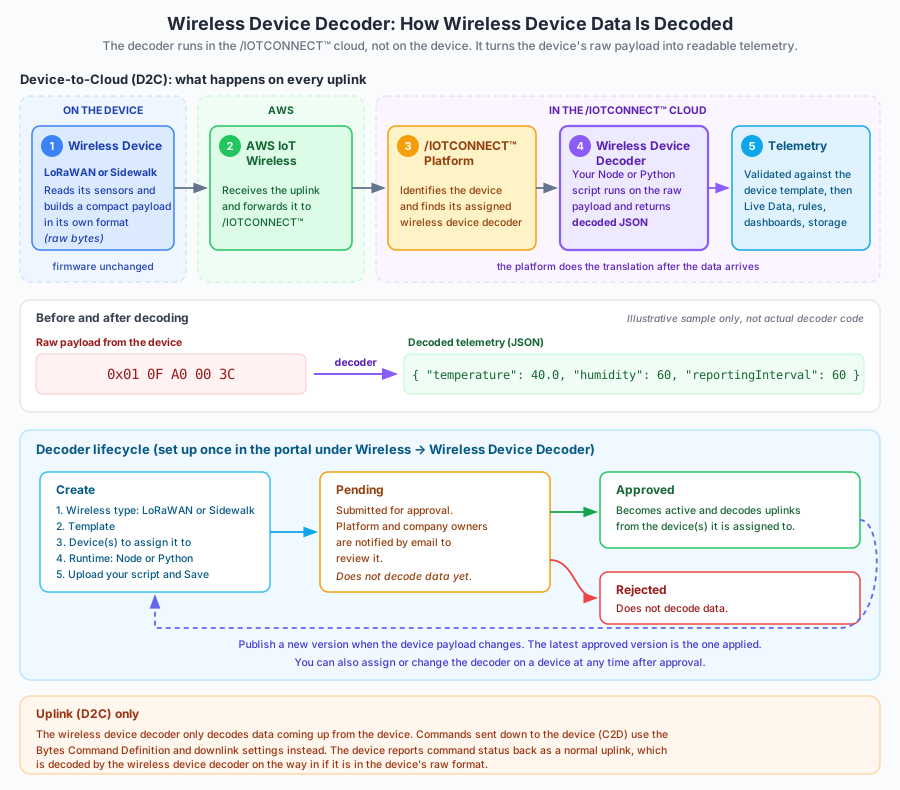
The decoder runs on the /IOTCONNECT™ platform (in the cloud) — not on the device. Your device firmware stays exactly as it is; the platform does the translation after the data arrives.

Attached to a template & device: a decoder is linked to a device template and a wireless type (LoRaWAN or Sidewalk), then assigned to the device(s) that use it.

Runtime: you choose the runtime your script needs — Node or Python.

Approval workflow: an uploaded decoder starts as Pending. Platform and company owners are notified by email to review it; once Approved it becomes active (it can also be Rejected).

Versioned: you can publish new versions of a decoder over time; the latest approved version is the one applied.

Runs on each uplink: when an assigned device sends data, the platform looks up its decoder and runs it, producing decoded telemetry.

The diagram below shows the full path and the decoder lifecycle.

Decoder data flow and lifecycle

Custom Decoder | Configuration & Device Integration

Watch the complete walkthrough demonstrating how to create a Custom Decoder, complete the admin approval process, integrate it with a wireless device, and update the assigned decoder in the IoTConnect platform.

Cloud-to-Device (C2D): How Commands Work

It is important to be precise here: the Decoder handles the uplink (D2C) direction only. For commands sent down to a wireless device (C2D / downlink), /IOTCONNECT™ uses a separate mechanism, not the Decoder.

Bytes Command Definition: wireless downlink commands are defined as byte commands, so the platform knows how to encode the command into the device’s expected byte format.

Downlink parameters: a downlink is sent with wireless settings such as the FPort, Downlink Mode (Sequential, Concurrent, or Using Uplink Gateway), Downlink Frequency, and Transmission settings.

Delivery: the encoded command is delivered through AWS IoT Wireless to the device on its next receive window.

Acknowledgement: the device acts on the command and reports status back as a normal uplink — which, if it is in the device’s raw format, is decoded by the Decoder on the way in.

So the two directions use different tools: Decoder for incoming data (D2C), and Bytes Command Definition + downlink settings for outgoing commands (C2D).

Creating & Integrating a Decoder

You create a decoder from the portal under Wireless → Decoder. The steps mirror the Create Decoder screen:

1. Choose the wireless type: Sidewalk or LoRaWAN.

2. Select the Template the decoder belongs to.

3. Select the Device (or devices) to assign it to.

4. Pick the Runtime: Node or Python.

5. Upload your script file and Save. The decoder is submitted for approval (Pending).

What your script does: it receives the device’s raw payload and returns a JSON object whose keys match the attributes defined in your device template. The returned values become the device’s telemetry.

Illustrative Python decoder skeleton (sample only — follow the structure provided in your portal’s decoder template):

def decode(payload):
    temperature = payload[1] / 10.0
    humidity = payload[2]
    return { "temperature": temperature, "humidity": humidity }

After approval, assign or change the decoder on a device at any time; publish new versions as your device firmware or payload evolves.

Error Handling & Troubleshooting

Decoder not approved yet: a decoder in Pending or Rejected status will not decode data. Make sure it has been Approved and assigned to the device.

Decoded keys don’t match the template: if the JSON keys your script returns don’t match the template’s attribute names/types, the values won’t appear as expected. Align the decoder output with the template attributes.

Invalid or unexpected payload: if the device sends bytes the script can’t parse, decoding fails for that message. Handle unexpected lengths/values defensively in your script.

Wrong wireless type or template: a decoder is tied to a specific wireless type (LoRaWAN/Sidewalk) and template — assigning it to a mismatched device won’t work.

C2D not decoding: remember the Decoder does not encode downlinks — use the Bytes Command Definition and downlink settings for commands.

Frequently Asked Questions

What is a Decoder? A script you upload that /IOTCONNECT™ runs in the cloud to translate a wireless device’s raw payload into readable telemetry.

Do I need one for standard JSON telemetry? No. Only use a decoder when your device sends raw/binary or non-standard payloads.

Can I keep my existing device payload format? Yes — that’s the point. The decoder adapts to your format; you don’t change the device.

Does the decoder run on the device or the cloud? In the cloud, on the /IOTCONNECT™ platform.

Which runtimes are supported? Node and Python.

Can one decoder serve multiple devices? Yes — a decoder is tied to a template and wireless type and can be assigned to multiple devices.

Does the decoder handle both D2C and C2D? No. It handles D2C (uplink decoding). Downlink commands use the Bytes Command Definition and downlink settings.

What happens if decoding fails? That message isn’t turned into valid telemetry. Check the script, payload format, and template attribute mapping.

Can I change or update the decoder later? Yes — decoders are versioned and can be reassigned; the latest approved version is used.

Does it change my device firmware? No. The decoder is entirely server-side; your firmware is untouched.

Why is my new decoder not working yet? It may still be Pending approval. It must be Approved and assigned before it decodes data.

ⓘ NOTE

Key facts: the Decoder runs in the /IOTCONNECT™ cloud (never on the device), supports LoRaWAN and Sidewalk wireless devices, uses Node or Python runtimes, goes through an approval workflow (Pending → Approved/Rejected), is versioned, and decodes uplink (D2C) data only — downlink commands (C2D) use the Bytes Command Definition and downlink settings.